
不一样的,
为您而设计

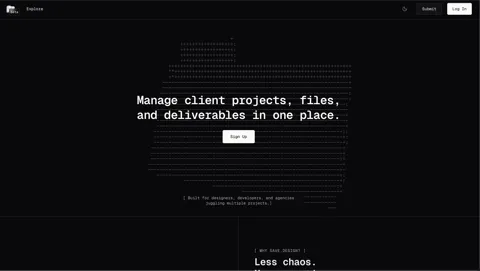
Every website, screenshot, interaction, file, and idea you save becomes searchable, reusable knowledge for your creative workflow.

www.lin-lang.com

Sign Up

Design inspiration is disconnected
from our actual work.

Time to change that.

Your Workspace

0 items organized

Stay organized across projects

Keep every client's files, links, and docs in their own workspace.

</>

Better inspiration browsing

Curated websites with technical insights, not just screenshots.

Professional delivery

Share one link with clients or team instead of 5 different file locations.

Build moodboards from your ideas and references.

Bring the sites, UI shots, videos and files you've saved onto an infinite canvas. Group them, label the groups, add notes, and draw connections. Create a direction someone can look at instead of read about.

Everything you add is automatically categorized and organized alongside your canvas. Your moodboards don't just stay as visual boards. They become searchable knowledge you can come back to later.

See Canvas
save.design

Design inspiration, and how it's built.

We don't just show you screenshots to scroll past. We show you what matters: Is it Next.js or Astro? Framer Motion or GSAP? What fonts? What CMS? Who built it?

Browse curated sites with project insights — the development decisions and design decisions, the why behind the work. Leave your own notes. Actually learn something you can use on your next project.

Explore Gallery
save.design

Inspiration you can search, not just scroll.

Animations, transitions, UI sections and branding from real websites — hand-picked and credited to their makers.

Every piece is sorted by UI pattern and titled by technique, so you find it by describing it: “dark hero section”, “scroll reveal”.

Save any of it to your library or a mood board — or let your AI agent pull references from it while it builds.

Explore elements
save.design

A save system designed for creatives.

Upload files and assets, save links, capture a section off any page — all with rich previews that actually show what you saved.

Images, videos, documents, references — all organized by project. Not generic cloud storage.

save.design

Save from any page, without leaving it.

Save a site with its tech stack attached, right-click any link, image or video, capture a single section, or record an interaction — straight from the tab you're on.

Every save lands in your workspace categorized and searchable, not as a bare bookmark.

See the extension
save.design
Brutalist pages42 items · 2d
Pricing inspo18 items · 1w
Hero animations27 items · 3d
Onboarding flows33 items · 5d
404 pages8 items · 2w
Mobile menus15 items · 1d
Cookie modals12 items · 3w
Loader animations31 items · 4d
Form designs19 items · 1w
Empty states22 items · 6d
Footer styles14 items · 2w
3D landings9 items · 1mo
Hero typography41 items · 1d
Sticky navs26 items · 5d
Color palettes36 items · 1w

Saved. But how do you find it?

Or add your own. Custom tags let you organize the way your brain works — and they work alongside Natural Search.

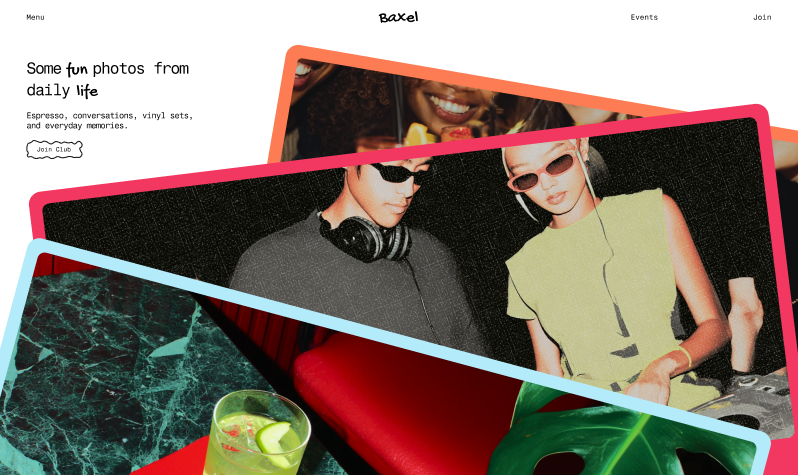
Home/sections/Tilted photo stack with col…
baxel.club ↗Saved to: sections
Custom tags+ Add
TitleTilted photo stack with colored borders and casual gallery feel
DescriptionThree rotated photo cards stacked on a clean white canvas with bright peach, magenta, and baby-blue borders — gives the section a hand-arranged, lifestyle-zine feel.
ESC CLOSE← PREVNEXT →

Save inspiration
with the breakdown attached.

We built analyzer for designers and devs — it catch Spline, Lenis, GSAP, Three.js, the whole modern stack, even the fonts you couldn't name on sight.

Analysis result
lumina.studio Save to folder
LuminaStudiolumina.studio
Framework
Next.js / React
Animation
GSAP / Framer Motion / Three.js
Fonts
Geist / Inter
Detection log
  • > Detected Next.js via __NEXT_DATA__
  • > Detected GSAP in /js/main.min.js
  • > Detected Framer Motion via React props
  • > Detected Geist family via @font-face
  • > Analyzing typography

Finally, plug your
workspace into your
AI tools.

Every save in your workspace — websites, sections, images, pages — is one MCP connection away from every AI tool you use.

Claude · save.design MCP
Youpull every brutalist reference

Testimonials

“Amazing product for design inspiration and organization, the attention to detail is next level.”
DiegoVP of Design at Rappi
“I have been using Save Design for the past 1 month and I really like its features for saving inspiration, code, and images. It helps me organize my work much better.”
PritamCreative Developer
“As someone thats been exhausted with trying new tools in the same space and have been reluctant in joining, this was an immediate sign up!”
RaziHealthtech Founder
“Save Design is criminally underrated. Every other tool is bloated, this does one thing perfectly: organize inspiration without the noise. I've tried everything. This is the only one I use daily.”
SebastianWeb Designer